

Proper cable tray installation is essential for keeping electrical and communication cables organized, supported, accessible, and protected throughout their service life. A cable tray system is not simply a metal pathway for cables. Its performance also depends on correct tray selection, support spacing, connections, bends, grounding, cable arrangement, and installation conditions.
For contractors, electrical engineers, and project buyers, understanding the installation process before purchasing cable tray and accessories can help prevent common problems such as insufficient support, difficult cable routing, excessive loading, and poor access for future maintenance.
This guide explains how cable tray is installed, what components are normally required, how to plan support locations, and what contractors should check before and after installation.
Table of Contents
What Is Cable Tray Installation?
Cable tray installation is the process of assembling and securing a cable tray system along a planned route so that it can safely support electrical, control, data, or communication cables.
A typical system may include:
- Cable tray sections
- Couplers or connecting plates
- Support brackets
- Hangers or support structures
- Bends and other directional fittings
- Dividers where cable separation is required
- Cable fixing accessories
- Fasteners and mounting hardware
The exact components depend on the tray type, cable load, building structure, routing requirements, and applicable electrical standards.
The installation should be planned as a complete system rather than treating the tray itself as an isolated component.
How Do You Install Cable Tray?
Although installation methods vary between projects, the general process follows a logical sequence. For projects using internationally recognized cable management practices, the IEC 61537 cable tray standard provides requirements and test methods relevant to cable tray and cable ladder systems.
1. Plan the Cable Route
Start by determining where the cables need to travel.
Identify:
- Cable starting and ending points
- Horizontal and vertical routes
- Changes in direction
- Equipment connection points
- Access and maintenance areas
- Potential obstacles
- Required separation between different cable groups
The route should provide enough space for the planned cables while allowing reasonable access for installation and future maintenance.
For complex projects, cable schedules and building drawings should be reviewed before support locations and tray dimensions are finalized.
2. Select the Appropriate Tray
The tray type should match the application.
Consider the:
- Cable type
- Cable quantity
- Cable weight
- Required cable capacity
- Installation environment
- Required mechanical protection
- Available installation space
- Future expansion requirements
Open tray systems can be useful where ventilation and cable accessibility are important, while other tray designs may be more appropriate where greater protection from environmental conditions is required.
3. Mark the Support Locations
Once the route has been established, mark where brackets, hangers, or other supports will be installed.
Support spacing should not simply be selected by habit. It depends on the tray construction, material, dimensions, cable loading, support configuration, and project requirements.
The manufacturer’s load tables and installation recommendations should be checked before installation.
4. Install the Supports
Install the selected support structures and make sure they are securely connected to the building or supporting structure.
Before placing the tray, check that:
- Supports are properly aligned
- Fixings are secure
- The supporting structure can carry the required load
- The route follows the approved installation drawings
- There is enough clearance for cable installation and maintenance
Poorly aligned supports can create unnecessary stress on tray connections and make later installation more difficult.
5. Install the Cable Tray Sections
Place the tray sections onto the prepared supports and align them along the planned route.
Connect adjacent sections using suitable couplers or connection hardware.
The connection should provide a secure and continuous mechanical assembly. Avoid forcing tray sections into alignment because this can distort the tray or place unnecessary stress on the connection points.
6. Install Bends and Directional Changes
Cable routes rarely consist entirely of straight sections.
Bends, tees, crosses, reducers, and other fittings may be required where the route changes direction or connects to another tray section.
Directional fittings should provide sufficient space for the cables to follow the route without excessive bending.
The minimum bending radius of the cable should always be considered when designing cable tray routes.
7. Install Vertical Sections
Vertical cable tray sections require particular attention because gravity can cause cables to move downward.
Depending on the cable type and installation design, additional cable fixing accessories may be required.
Cable fixing clamps can help secure cables at selected locations and maintain an organized route, particularly around vertical sections, transitions, and equipment connections.
The fixing method should hold the cable securely without damaging the cable sheath.
8. Check Connections and Alignment
After assembling the tray system, inspect the entire route.
Check that:
- Tray sections are properly connected
- Supports are secure
- The route is correctly aligned
- No sharp edges could damage cables
- Fasteners are properly tightened
- Bends provide adequate cable clearance
- The system has sufficient capacity for the planned cables
This inspection should take place before cables are installed.
How Far Apart Should Cable Tray Supports Be?
There is no single support spacing that applies to every cable tray installation.
The appropriate distance depends on:
- Tray type
- Tray material
- Tray width
- Tray construction
- Cable weight
- Cable loading
- Support configuration
- Installation environment
- Applicable project standards
A lightweight tray carrying a small number of communication cables may have very different requirements from a heavy-duty tray carrying multiple power cables.
For this reason, contractors should use the manufacturer’s load and span information rather than applying a universal spacing rule.
When purchasing cable tray for a project, ask the supplier for the relevant load capacity and support span information for the selected tray specification.

What Accessories Are Needed for Cable Tray Installation?
The tray is only one part of a complete cable management system.
Cable Tray Couplers
Couplers connect individual tray sections and help create a continuous route.
They are particularly important where multiple tray sections are assembled into long cable pathways.
Support Brackets
Brackets support the tray and transfer the cable and tray load to the building structure.
Different installation environments may require wall-mounted, ceiling-mounted, floor-mounted, or suspended support arrangements.
Cable Fixing Clamps
Cable fixing clamps provide additional restraint where cables need to remain in a defined position.
They can be useful on vertical runs, bends, transitions, and equipment connection areas.
Cable Tray Dividers
Dividers can separate cable groups where the project requires different types of cables to be routed within the same tray system.
Fasteners and Mounting Hardware
Bolts, nuts, washers, and other hardware are used to connect tray sections and secure the tray to its supports.
All components should be compatible with the selected tray system.
Should Power and Data Cables Be Installed in the Same Tray?
It depends on the project design and applicable electrical and communication requirements.
Power cables and data or communication cables can be affected by electromagnetic interference, depending on cable type, voltage, current, routing, and installation conditions.
Where separation is required, cable tray dividers or separate tray routes may be used.
The correct approach should be determined according to the cable specifications, system design, and applicable local standards rather than assuming that all power and data cables can share the same tray without separation.
Can Cable Tray Be Installed Vertically?
Yes. Cable tray can be installed vertically when the system and supports are designed for vertical routing.
However, vertical installation requires additional consideration because cables are affected by gravity.
Depending on the cable type and project requirements, additional cable fixing may be necessary to prevent excessive movement or loading on cable connections.
The tray itself also needs appropriate support at the required locations.
For vertical installations, both tray support and cable restraint should be considered during the design stage.
How Much Cable Can a Cable Tray Hold?
Cable tray capacity depends on the actual tray and cable configuration.
Important factors include:
- Tray width
- Tray depth
- Tray material
- Cable diameter
- Number of cables
- Cable weight
- Cable arrangement
- Support spacing
For example, a tray carrying ten lightweight communication cables has very different loading requirements from one carrying multiple large power cables.
Do not determine tray capacity from tray dimensions alone. The supplier’s load data and the project’s cable schedule should be reviewed together.
What Should You Consider Before Installing Cable Tray?
Good installation starts before the first bracket is mounted.
Cable Loading
Determine the approximate total weight of the cables that the tray will carry.
Tray Dimensions
Select a width and depth that accommodate the current cable requirements and, where appropriate, allow room for future expansion.
Installation Environment
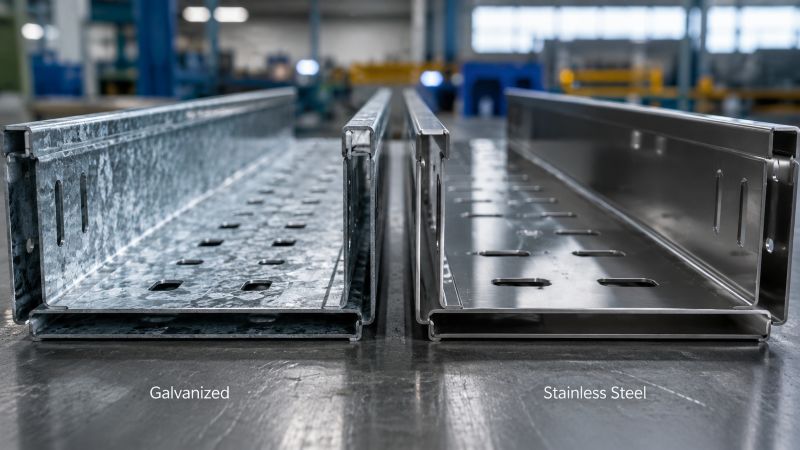
Indoor electrical rooms, outdoor installations, coastal locations, and industrial environments may require different materials or corrosion-resistant finishes.
Cable Protection
Consider whether the cables need additional protection from impact, dust, water, chemicals, or other environmental conditions.
Maintenance Access
Leave sufficient working space around the tray where maintenance personnel need to inspect or modify cables.
Future Expansion
If additional cables are expected in the future, avoid designing the system with no available capacity.
Common Cable Tray Installation Mistakes
Several problems can be avoided through better planning.
Using Insufficient Supports
Excessive support spans can affect tray deflection and system stability.
Support spacing should be based on the selected tray and actual loading conditions.
Overloading the Tray
A tray should not be treated as having unlimited capacity simply because there appears to be available physical space.
Cable weight and tray load capacity need to be considered together.
Ignoring Cable Bending Radius
Cables should not be forced around bends tighter than their permitted minimum bending radius.
This is particularly important for larger power cables, fiber-optic cables, and other cables with specific bending requirements.
Mixing Cable Types Without Planning
Different cable systems may have different separation requirements.
Power, control, data, and communication cables should be arranged according to the project design.
Choosing Accessories Separately
Using brackets, couplers, clamps, or other components that are not compatible with the tray can create installation difficulties.
Where possible, select the tray and accessories as a coordinated system.
Leaving No Space for Future Cables
A tray that is completely filled during the initial installation may become difficult to maintain or expand.
Future capacity should be considered when designing long-term cable management systems.
How Can You Make Cable Tray Installation Easier?
The easiest installations usually result from good preparation rather than faster physical assembly.
Before ordering materials, prepare the cable schedule and routing drawings. Confirm the tray dimensions, material, support configuration, connection method, and accessory requirements.
For larger projects, it is also useful to provide the supplier with:
- Cable types
- Cable diameters
- Cable quantities
- Approximate cable weight
- Required tray width
- Installation environment
- Support conditions
- Project quantity
- Drawings where available
This information allows the tray and accessories to be evaluated as a complete system instead of selecting individual components independently.
Cable Tray Installation Checklist
Before completing the installation, verify the following:
| Check Item | What to Confirm |
|---|---|
| Cable route | Route matches approved drawings |
| Tray size | Suitable for cable quantity and dimensions |
| Load capacity | Adequate for cable weight |
| Supports | Correctly positioned and securely fixed |
| Connections | Tray sections properly joined |
| Bends | Sufficient space for cable routing |
| Cable separation | Meets project requirements |
| Cable fixing | Additional restraint provided where necessary |
| Environment | Material and finish suit installation conditions |
| Maintenance | Adequate access remains available |
| Future capacity | Additional cable requirements considered |
A final inspection should be completed before the cable system is placed into service.
FAQ
What is the first step in cable tray installation?
The first step is to plan the cable route based on cable types, quantities, equipment locations, installation conditions, and maintenance requirements.
How do I determine cable tray support spacing?
Support spacing should be determined from the tray manufacturer’s load and span data together with the actual cable loading and project requirements.
Can cable tray be installed outdoors?
Yes, provided the selected tray material and finish are appropriate for the environmental conditions. Outdoor and coastal installations may require higher corrosion resistance.
Does every cable tray need cable fixing clamps?
Not necessarily. The need for additional cable restraint depends on the cable type, tray orientation, routing, and project requirements. Clamps are particularly useful in certain vertical and transition sections.
What information should I provide when buying cable tray?
Provide the cable type, cable quantity, cable diameter or dimensions, approximate cable weight, required route, installation environment, tray dimensions if known, and project quantity.
How do I select cable tray accessories?
Accessories should be selected to match the tray system and installation method. Common accessories include couplers, brackets, dividers, fixing clamps, and mounting hardware.
Final Takeaway
Successful cable tray installation depends on more than placing a tray along a cable route. The tray, supports, connections, accessories, cable loading, environmental conditions, and maintenance requirements all need to work together.
Start with the cable schedule and routing plan, select the appropriate tray system, calculate the required capacity, design the support arrangement, and choose compatible accessories. For vertical sections and other areas where cable movement needs to be controlled, additional cable fixing may also be required.
If you are planning a cable tray project, providing the cable specifications and installation requirements to the supplier before ordering can help you select a more suitable tray and accessory configuration.
Need cable tray, couplers, fixing clamps, or other cable management accessories for your project? Contact HFJD with your project specifications and quantity requirements for a suitable solution.