

Proper cable tray installation is essential for keeping electrical and communication cables organized, supported, accessible, and protected throughout their service life. A cable tray system is not simply a metal pathway for cables. Its performance also depends on correct tray selection, support spacing, connections, bends, grounding, cable arrangement, and installation conditions.
For contractors, electrical engineers, and project buyers, understanding the installation process before purchasing cable tray and accessories can help prevent common problems such as insufficient support, difficult cable routing, excessive loading, and poor access for future maintenance.
This guide explains how bandeja de cables is installed, what components are normally required, how to plan support locations, and what contractors should check before and after installation.
Tabla de contenidos
What Is Cable Tray Installation?
Cable tray installation is the process of assembling and securing a cable tray system along a planned route so that it can safely support electrical, control, data, or communication cables.
A typical system may include:
- Cable tray sections
- Couplers or connecting plates
- Support brackets
- Hangers or support structures
- Bends and other directional fittings
- Dividers where cable separation is required
- Cable fixing accessories
- Fasteners and mounting hardware
The exact components depend on the tray type, cable load, building structure, routing requirements, and applicable electrical standards.
The installation should be planned as a complete system rather than treating the tray itself as an isolated component.
How Do You Install Cable Tray?
Although installation methods vary between projects, the general process follows a logical sequence. For projects using internationally recognized cable management practices, the IEC 61537 cable tray standard provides requirements and test methods relevant to cable tray and cable ladder systems.
1. Plan the Cable Route
Start by determining where the cables need to travel.
Identify:
- Cable starting and ending points
- Horizontal and vertical routes
- Changes in direction
- Equipment connection points
- Access and maintenance areas
- Potential obstacles
- Required separation between different cable groups
The route should provide enough space for the planned cables while allowing reasonable access for installation and future maintenance.
For complex projects, cable schedules and building drawings should be reviewed before support locations and tray dimensions are finalized.
2. Select the Appropriate Tray
The tray type should match the application.
Consider the:
- Tipo de cable
- Cantidad de cable
- Peso del cable
- Required cable capacity
- Entorno de instalación
- Required mechanical protection
- Available installation space
- Future expansion requirements
Open tray systems can be useful where ventilation and cable accessibility are important, while other tray designs may be more appropriate where greater protection from environmental conditions is required.
3. Mark the Support Locations
Once the route has been established, mark where brackets, hangers, or other supports will be installed.
Support spacing should not simply be selected by habit. It depends on the tray construction, material, dimensions, cable loading, support configuration, and project requirements.
The manufacturer’s load tables and installation recommendations should be checked before installation.
4. Install the Supports
Install the selected support structures and make sure they are securely connected to the building or supporting structure.
Before placing the tray, check that:
- Supports are properly aligned
- Fixings are secure
- The supporting structure can carry the required load
- The route follows the approved installation drawings
- There is enough clearance for cable installation and maintenance
Poorly aligned supports can create unnecessary stress on tray connections and make later installation more difficult.
5. Install the Cable Tray Sections
Place the tray sections onto the prepared supports and align them along the planned route.
Connect adjacent sections using suitable couplers or connection hardware.
The connection should provide a secure and continuous mechanical assembly. Avoid forcing tray sections into alignment because this can distort the tray or place unnecessary stress on the connection points.
6. Install Bends and Directional Changes
Cable routes rarely consist entirely of straight sections.
Bends, tees, crosses, reducers, and other fittings may be required where the route changes direction or connects to another tray section.
Directional fittings should provide sufficient space for the cables to follow the route without excessive bending.
The minimum bending radius of the cable should always be considered when designing cable tray routes.
7. Install Vertical Sections
Vertical cable tray sections require particular attention because gravity can cause cables to move downward.
Depending on the cable type and installation design, additional cable fixing accessories may be required.
Cable fixing clamps can help secure cables at selected locations and maintain an organized route, particularly around vertical sections, transitions, and equipment connections.
The fixing method should hold the cable securely without damaging the cable sheath.
8. Check Connections and Alignment
After assembling the tray system, inspect the entire route.
Check that:
- Tray sections are properly connected
- Supports are secure
- The route is correctly aligned
- No sharp edges could damage cables
- Fasteners are properly tightened
- Bends provide adequate cable clearance
- The system has sufficient capacity for the planned cables
This inspection should take place before cables are installed.
How Far Apart Should Cable Tray Supports Be?
There is no single support spacing that applies to every cable tray installation.
The appropriate distance depends on:
- Tipo bandeja
- Tray material
- Ancho de la bandeja
- Tray construction
- Peso del cable
- Cable loading
- Support configuration
- Entorno de instalación
- Applicable project standards
A lightweight tray carrying a small number of communication cables may have very different requirements from a heavy-duty tray carrying multiple power cables.
For this reason, contractors should use the manufacturer’s load and span information rather than applying a universal spacing rule.
When purchasing cable tray for a project, ask the supplier for the relevant load capacity and support span information for the selected tray specification.

What Accessories Are Needed for Cable Tray Installation?
The tray is only one part of a complete cable management system.
Acopladores de bandejas de cables
Couplers connect individual tray sections and help create a continuous route.
They are particularly important where multiple tray sections are assembled into long cable pathways.
Soportes de soporte
Brackets support the tray and transfer the cable and tray load to the building structure.
Different installation environments may require wall-mounted, ceiling-mounted, floor-mounted, or suspended support arrangements.
Abrazaderas de fijación de cables
Cable fixing clamps provide additional restraint where cables need to remain in a defined position.
They can be useful on vertical runs, bends, transitions, and equipment connection areas.
Cable Tray Dividers
Dividers can separate cable groups where the project requires different types of cables to be routed within the same tray system.
Fasteners and Mounting Hardware
Bolts, nuts, washers, and other hardware are used to connect tray sections and secure the tray to its supports.
All components should be compatible with the selected tray system.
Should Power and Data Cables Be Installed in the Same Tray?
It depends on the project design and applicable electrical and communication requirements.
Power cables and data or communication cables can be affected by electromagnetic interference, depending on cable type, voltage, current, routing, and installation conditions.
Where separation is required, cable tray dividers or separate tray routes may be used.
The correct approach should be determined according to the cable specifications, system design, and applicable local standards rather than assuming that all power and data cables can share the same tray without separation.
Can Cable Tray Be Installed Vertically?
Yes. Cable tray can be installed vertically when the system and supports are designed for vertical routing.
However, vertical installation requires additional consideration because cables are affected by gravity.
Depending on the cable type and project requirements, additional cable fixing may be necessary to prevent excessive movement or loading on cable connections.
The tray itself also needs appropriate support at the required locations.
For vertical installations, both tray support and cable restraint should be considered during the design stage.
How Much Cable Can a Cable Tray Hold?
Cable tray capacity depends on the actual tray and cable configuration.
Important factors include:
- Ancho de la bandeja
- Tray depth
- Tray material
- Cable diameter
- Number of cables
- Peso del cable
- Cable arrangement
- Espaciado de soporte
For example, a tray carrying ten lightweight communication cables has very different loading requirements from one carrying multiple large power cables.
Do not determine tray capacity from tray dimensions alone. The supplier’s load data and the project’s cable schedule should be reviewed together.
What Should You Consider Before Installing Cable Tray?
Good installation starts before the first bracket is mounted.
Cable Loading
Determine the approximate total weight of the cables that the tray will carry.
Tray Dimensions
Select a width and depth that accommodate the current cable requirements and, where appropriate, allow room for future expansion.
Entorno de instalación
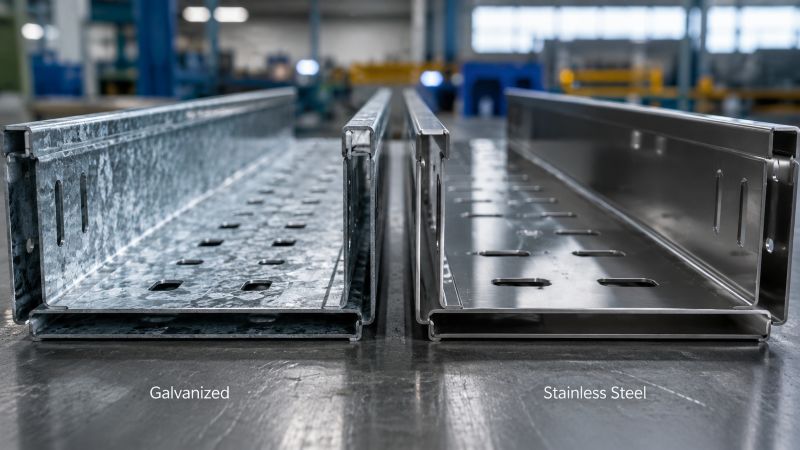
Indoor electrical rooms, outdoor installations, coastal locations, and industrial environments may require different materials or corrosion-resistant finishes.
Cable Protection
Consider whether the cables need additional protection from impact, dust, water, chemicals, or other environmental conditions.
Maintenance Access
Leave sufficient working space around the tray where maintenance personnel need to inspect or modify cables.
Ampliación futura
Si se esperan cables adicionales en el futuro, evite diseñar el sistema sin capacidad disponible.
Common Cable Tray Installation Mistakes
Se pueden evitar varios problemas mediante una mejor planificación.
Uso de soportes insuficientes
Los tramos de soporte excesivos pueden afectar la deflexión de la bandeja y la estabilidad del sistema.
El espaciado del soporte debe basarse en la bandeja seleccionada y las condiciones de carga reales.
Sobrecargando la bandeja
No se debe considerar que una bandeja tiene capacidad ilimitada simplemente porque parece haber espacio físico disponible.
El peso del cable y la capacidad de carga de la bandeja deben considerarse juntos.
Ignorando el radio de flexión del cable
Los cables no deben forzarse alrededor de curvas más cerradas que su radio de flexión mínimo permitido.
Esto es particularmente importante para cables de alimentación más grandes, cables de fibra óptica y otros cables con requisitos de flexión específicos.
Mezclar tipos de cables sin planificación
Diferentes sistemas de cables pueden tener diferentes requisitos de separación.
Los cables de alimentación, control, datos y comunicación deben disponerse según el diseño del proyecto.
Elegir accesorios por separado
El uso de soportes, acopladores, abrazaderas u otros componentes que no sean compatibles con la bandeja puede crear dificultades de instalación.
Siempre que sea posible, seleccione la bandeja y los accesorios como un sistema coordinado.
No dejar espacio para futuros cables
Una bandeja que esté completamente llena durante la instalación inicial puede resultar difícil de mantener o expandir.
Se debe considerar la capacidad futura al diseñar sistemas de gestión de cables a largo plazo.
How Can You Make Cable Tray Installation Easier?
Las instalaciones más sencillas suelen ser el resultado de una buena preparación en lugar de un montaje físico más rápido.
Antes de pedir materiales, prepare los dibujos de programación y enrutamiento de cables. Confirme las dimensiones de la bandeja, el material, la configuración del soporte, el método de conexión y los requisitos de accesorios.
Para proyectos más grandes, también es útil proporcionar al proveedor:
- Tipos de cables
- Diámetros de cable
- Cantidades de cable
- Peso aproximado del cable
- Ancho de bandeja requerido
- Entorno de instalación
- Condiciones de soporte
- Cantidad del proyecto
- Dibujos donde estén disponibles
Esta información permite evaluar la bandeja y los accesorios como un sistema completo en lugar de seleccionar componentes individuales de forma independiente.
Cable Tray Installation Checklist
Antes de completar la instalación, verifique lo siguiente:
| Verificar artículo | Qué confirmar |
|---|---|
| Ruta del cable | La ruta coincide con los dibujos aprobados |
| Tamaño de la bandeja | Adecuado para cantidad y dimensiones de cables |
| Capacidad de carga | Adecuado para el peso del cable |
| Soportes | Correctamente colocado y fijado de forma segura |
| Conexiones | Secciones de bandeja correctamente unidas |
| Curvas | Espacio suficiente para el tendido de cables |
| Separación de cables | Cumple con los requisitos del proyecto |
| Fijación de cables | Se proporciona restricción adicional cuando sea necesario |
| Medio Ambiente | Condiciones de instalación del material y acabado del traje |
| Mantenimiento | Sigue disponible un acceso adecuado |
| Capacidad futura | Se consideran requisitos de cable adicionales |
Se debe completar una inspección final antes de poner en servicio el sistema de cable.
Preguntas frecuentes
¿Cuál es el primer paso en la instalación de la bandeja portacables?
El primer paso es planificar la ruta del cable en función de los tipos de cable, cantidades, ubicaciones de los equipos, condiciones de instalación y requisitos de mantenimiento.
¿Cómo determino el espaciado de los soportes de la bandeja portacables?
El espaciado de soporte debe determinarse a partir de los datos de carga y extensión del fabricante de la bandeja junto con la carga real del cable y los requisitos del proyecto.
¿Se puede instalar la bandeja portacables en exteriores?
Sí, siempre que el material y el acabado de la bandeja seleccionados sean apropiados para las condiciones ambientales. Las instalaciones exteriores y costeras pueden requerir una mayor resistencia a la corrosión.
¿todas las bandejas portacables necesitan abrazaderas de fijación de cables?
No necesariamente. La necesidad de sujeción adicional del cable depende del tipo de cable, la orientación de la bandeja, el enrutamiento y los requisitos del proyecto. Las abrazaderas son particularmente útiles en ciertas secciones verticales y de transición.
¿Qué información debo proporcionar al comprar una bandeja portacables?
Proporcione el tipo de cable, la cantidad de cable, el diámetro o las dimensiones del cable, el peso aproximado del cable, la ruta requerida, el entorno de instalación, las dimensiones de la bandeja, si se conocen, y la cantidad del proyecto.
¿Cómo selecciono los accesorios para bandejas portacables?
Los accesorios deben seleccionarse para que coincidan con el sistema de bandeja y el método de instalación. Los accesorios comunes incluyen acopladores, soportes, divisores, abrazaderas de fijación y herrajes de montaje.
Conclusión final
La instalación exitosa de una bandeja portacables depende de algo más que colocar una bandeja a lo largo de una ruta de cable. La bandeja, los soportes, las conexiones, los accesorios, la carga del cable, las condiciones ambientales y los requisitos de mantenimiento deben trabajar juntos.
Comience con el programa de cables y el plan de enrutamiento, seleccione el sistema de bandeja apropiado, calcule la capacidad requerida, diseñe la disposición de soporte y elija accesorios compatibles. Para secciones verticales y otras áreas donde es necesario controlar el movimiento del cable, es posible que también se requiera fijación adicional del cable.
Si está planeando un proyecto de bandeja portacables, proporcionar las especificaciones del cable y los requisitos de instalación al proveedor antes de realizar el pedido puede ayudarlo a seleccionar una configuración de bandeja y accesorios más adecuada.
¿Necesita bandeja de cables, acopladores, abrazaderas de fijación u otros accesorios de gestión de cables para su proyecto? Póngase en contacto con HFJD con las especificaciones de su proyecto y los requisitos de cantidad para una solución adecuada.